SenseTime Open-Sources SenseNova U1.6: An 8B Image Model That Checks Its Own Work
SenseTime has open-sourced SenseNova U1.6, an 8B image model that draws a picture, reads it back and fixes its own mistakes. SenseTime reports its UltraTextBench score rises from 86.04 to 92.28 with self-correction on.

At a glance: SenseTime has released SenseNova U1.6, an 8-billion-parameter image model that draws a picture, reads it back, and fixes its own mistakes. The weights are open under Apache 2.0. SenseTime says the self-check lifts its score on dense infographics from 86.04 to 92.28 — its own numbers, not independently verified.
Bad text in AI images is the oldest tell in the book. A poster looks perfect until you read it: a misspelled headline, a wrong date, a number that makes no sense. SenseNova U1.6 attacks that exact problem, and it does it inside one model instead of handing the fix to a second tool.
The release landed on 24 November, with the weights published on Hugging Face under the Apache 2.0 licence. It is the latest in SenseTime’s U series of unified models, which use one set of weights for both understanding images and generating them. That shared design is what makes the self-correction trick possible at all.
What does self-correction actually do?
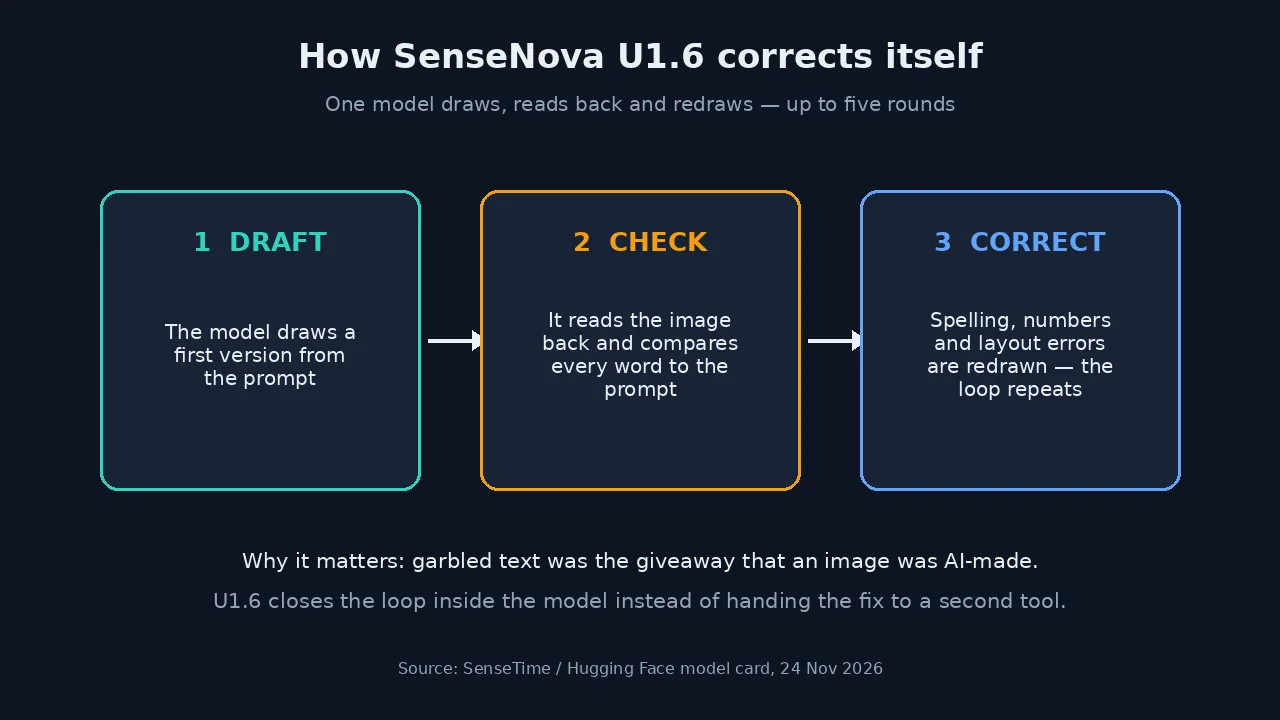
Most image models generate once and stop. U1.6 generates a draft, then looks at it again and compares every word against the original prompt. If it finds a spelling error, a wrong number or a skewed layout, it draws a corrected version.
The check covers more than text. It also looks at portrait lighting, illustration brushwork, and how fonts and layout sit together in a poster. The model handles perspective text and artistic typography, and even unusual glyphs and handwriting — the cases where image models usually fall apart first.
One early tester found the loop can run up to five rounds before it stops. Each round costs time — a self-corrected infographic took around a minute on a consumer RTX 3090 in that test — but the result is an image you can actually publish without opening an editor.
Takeaways:
- One model does the drawing and the proofreading — no second model or editing tool in the loop.
- The fix covers spelling, numbers, layout, lighting and typography, not just typos.
- Self-correction costs time: several rounds of generation instead of one.
How good are the numbers?
SenseTime reports the gain on UltraTextBench, its test for text-heavy infographics. A single pass scores 86.04. With self-correction switched on, the same model scores 92.28 — a relative improvement of about 7%. The company also says user evaluations rate U1.6 Lite about 10% higher on aesthetics than the previous U1.5 Lite.
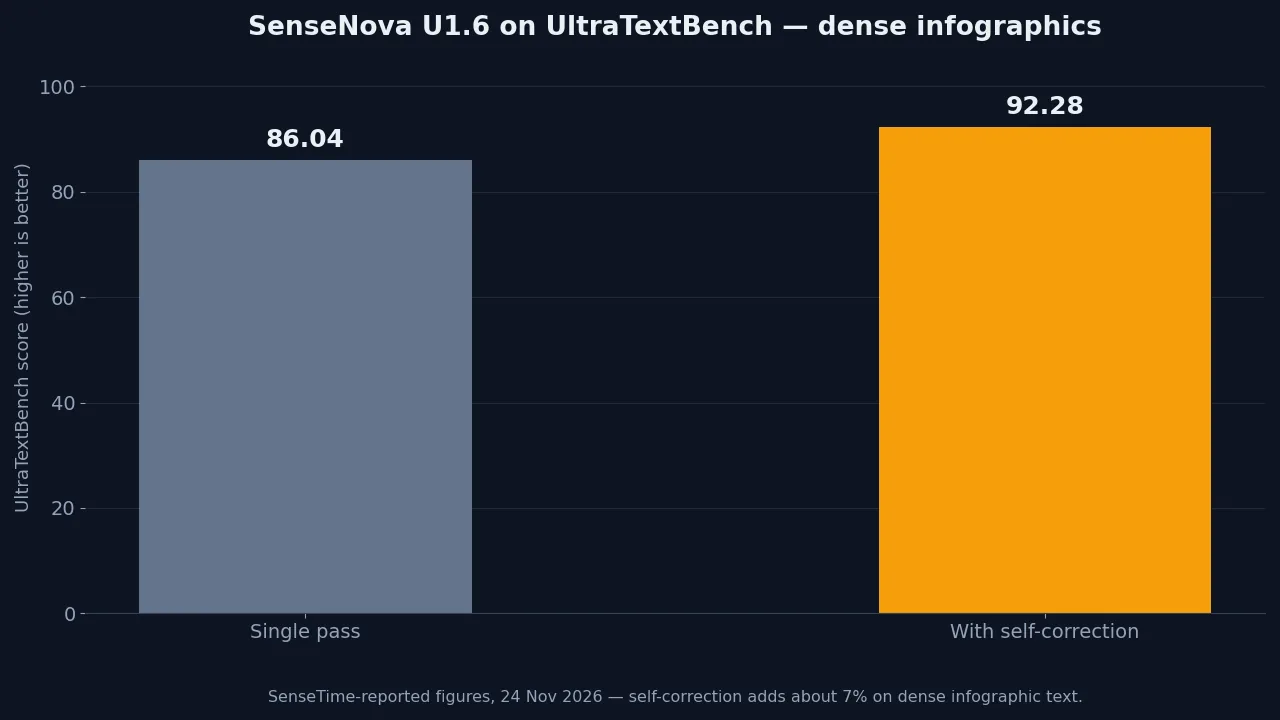
Both figures are SenseTime’s own. No independent leaderboard has published U1.6 results yet, so treat them as the vendor’s claim until someone else reproduces them. That is the honest position for any launch-day benchmark.
Key numbers:
- 8B parameters — the open model, built on SenseTime’s NEO-unify architecture.
- Apache 2.0 — the licence, so commercial use is open.
- 92.28 vs 86.04 — UltraTextBench with and without self-correction, per SenseTime.
- 2368 × 1760 — the default image size, roughly 4 megapixels.
- English and Chinese — the two languages the model officially supports.
What can you run it on?
The weights are on Hugging Face as SenseNova-U1.6-8B-MoT, a BF16 checkpoint, with the runtime in SenseTime’s GitHub repository. ComfyUI supports the self-correction flow natively from version 0.46, which matters: it puts the model straight into the tool most image creators already use. The model is also available in SenseNova Studio and through SenseNova’s platform API, and 4-step and 8-step LoRA adapters are published for faster sampling.
U1.6 arrives in a month when looping is the idea everyone is borrowing. Z.ai’s GLM-5.4 reuses 28 layers twice to reason deeper, and SenseTime’s own SenseNova-Loop-9B, released a week earlier, does the same trick for language. U1.6 applies the loop idea to images instead — not more parameters, but more passes over the same work.
It is also the latest in a run of open-weight releases from Chinese labs this month. Ant Group’s Ling-3.2-air opened a 124-billion-parameter model under the MIT licence, and Baidu’s ERNIE 5.5 Flash Preview arrived under Apache 2.0. U1.6 is far smaller than either, but it competes on a different axis: not scale, but whether the output is usable as-is.
What are the catches?
Three, and the model card states them plainly. First, the benchmarks are SenseTime’s own, with no independent check yet. Second, you need the matching U1.6 runtime — assumptions carried over from U1.5 do not apply without validation. Third, complex layouts, dense text and small human details may still need further validation, even with the loop switched on.
None of that takes away from the release. Open weights, a permissive licence, day-one ComfyUI support and a feature aimed squarely at the most visible flaw in AI images is a strong combination. The question is whether the self-correction holds up outside SenseTime’s own tests — and that answer comes from the people downloading it now.
Takeaways:
- U1.6’s edge is usability, not size: clean text in the image on the first try.
- The 7% UltraTextBench gain and the 10% aesthetics gain are vendor-reported, not verified.
- ComfyUI 0.46 support makes it usable today, not just downloadable.
Bottom line: SenseNova U1.6 is a small open model with one big idea — an image generator that proofreads its own work — and if the numbers hold up outside SenseTime’s lab, it sets a new bar for text in AI images.
What is SenseNova U1.6?
SenseNova U1.6 is an 8-billion-parameter open-weight image model from SenseTime, released on 24 November 2026 under the Apache 2.0 licence. It is a unified multimodal model: the same weights both understand images and generate them, which lets it check its own output and correct it.
How does SenseNova U1.6 self-correction work?
With self-correction enabled, U1.6 draws a draft, reads it back, compares the text against the original prompt, and redraws the image if it finds errors in spelling, numbers or layout. The loop can run up to five rounds. SenseTime reports the score on its UltraTextBench dense-infographic test rises from 86.04 on a single pass to 92.28 with self-correction, a vendor-reported figure not yet independently verified.
Where can I try SenseNova U1.6?
The weights are published on Hugging Face as sensenova/SenseNova-U1.6-8B-MoT, with the runtime in SenseTime’s GitHub repository. ComfyUI supports the self-correction flow natively from version 0.46, and the model is also available in SenseNova Studio and through SenseNova’s platform API. The model officially supports English and Chinese.